

As platforms grow to serve large enterprises, performance stops being a single number and becomes a distribution. Features keep shipping, each one adding a little work to an existing page, and no single change is large enough to notice on its own. For a customer, that means users can experience slow pages while the platform still looks healthy overall. Performance is part of the product experience rather than a property of the infrastructure underneath it, and we treat it as a first-class citizen.
At Eightfold, our platform serves some of the world’s largest enterprises across talent acquisition, workforce planning, and career development. The data volumes between our smaller and larger tenants span more than three orders of magnitude. One customer pages through ten thousand records; another opens the same page, on the same build, on the same afternoon, and pages through twenty million. The same page is a different product depending on who is logged in.
In this post, we’ll cover how we measure page performance per customer rather than in aggregate, the instrumentation we collect from the browser without asking anyone to reproduce a problem, the checks and agents that keep pages fast as the product changes, the tooling that turns “this page is slow” into “here is what happened on this page load,” and why we publish every customer’s latency to that customer.
Measuring one customer at a time
Ask whether the product is fast and any single answer is an average across that spread. An average across that distribution describes a user who does not exist.
So we do not track it. We track the percentage of customers meeting a stated latency target, per page and per API, every day.
The difference is operational, not semantic. A fleet average stays healthy while your largest tenant has a terrible week. A per-customer compliance ratio cannot. One customer’s bad experience stops being absorbable into everyone else’s good one, and it surfaces the same morning rather than in a quarterly escalation.
Holding every tenant to that target independently, across every page, every day, is where the engineering went.
Instrumentation at every layer
Server-side request duration is the easiest thing to measure, but on its own it captures only one part of the customer experience. It excludes the network, it excludes the browser, and it treats one perceived page load as one request when it is usually several sequential round trips.
We instrument the whole path:
- Total page-interactive time — navigation start to the moment the user can actually work with the page. The industry standard for page speed is time to first byte, which tells you when our server began answering. It doesn’t tell you when a recruiter can open a candidate profile, so we measure past it. Each page declares which load events define “finished,” and we stamp the time when the last of them fires. It is an application-defined mark rather than a generic proxy like TTI or LCP.
- Every API call the page made, individually, with its own latency, so you can attribute a slow page to the specific request responsible.
- The browser’s own view — how much of the wait happened on the user’s machine rather than on ours.
- The network component, end to end — the part of the wait that belongs to the connection between the user and us.
- The edge — what happened at our CDN, the layer closest to the user, before the request reached our servers at all.
- Component-level I/O inside each API — the work an endpoint does against the systems behind it. We record both the time spent and the number of calls made at each layer: database reads, cache lookups, and search queries. A single endpoint that looks uniformly slow usually isn’t; the time is concentrated in one of those layers, and recording them separately makes that visible without a profiler.
Call counts matter as much as time. If you watch only latency, a change that turns one database call into fifty passes review, because each individual call is still fast. You find out when the page falls over. If you watch call counts, you find out the day it ships.
Every one of these is a daily time series per customer. We compare a customer against what’s normal for them, rather than against a fleet baseline.
Instrumenting a page is a configuration change. The page declares which load events define “finished” and which API calls belong to it, and the telemetry starts flowing; every app in our front end registers its pages this way. What gets published as a tracked KPI is a separate, deliberate decision — a second configuration names the specific page and API metrics we hold ourselves to and surface to customers. We instrument broadly and publish selectively, so the customer-facing view covers the journeys that matter rather than everything the platform happens to emit.
Why we rarely need a HAR file
The conventional product loop is that a user reports a slow page, you ask them to reproduce it with dev tools open, and days later a large HAR file arrives — a recording of their browser’s network activity, captured on a different day, on a different network, by a different user, on a page that was fine at the time.
We usually skip that, because we already hold the data.
The browser’s Resource Timing API records every resource a page fetches, with full timing breakdowns, and it sits in the user’s browser for free. When a page becomes interactive, we collect the individual entries and add one thing on top.
We attach our own trace ID to the API calls. The client captures the trace identifier the server returns and matches it to the corresponding browser timing entry. A slow bar in the browser waterfall then follows into the server-side trace for that request, so the number the user experienced connects to the work that produced it.
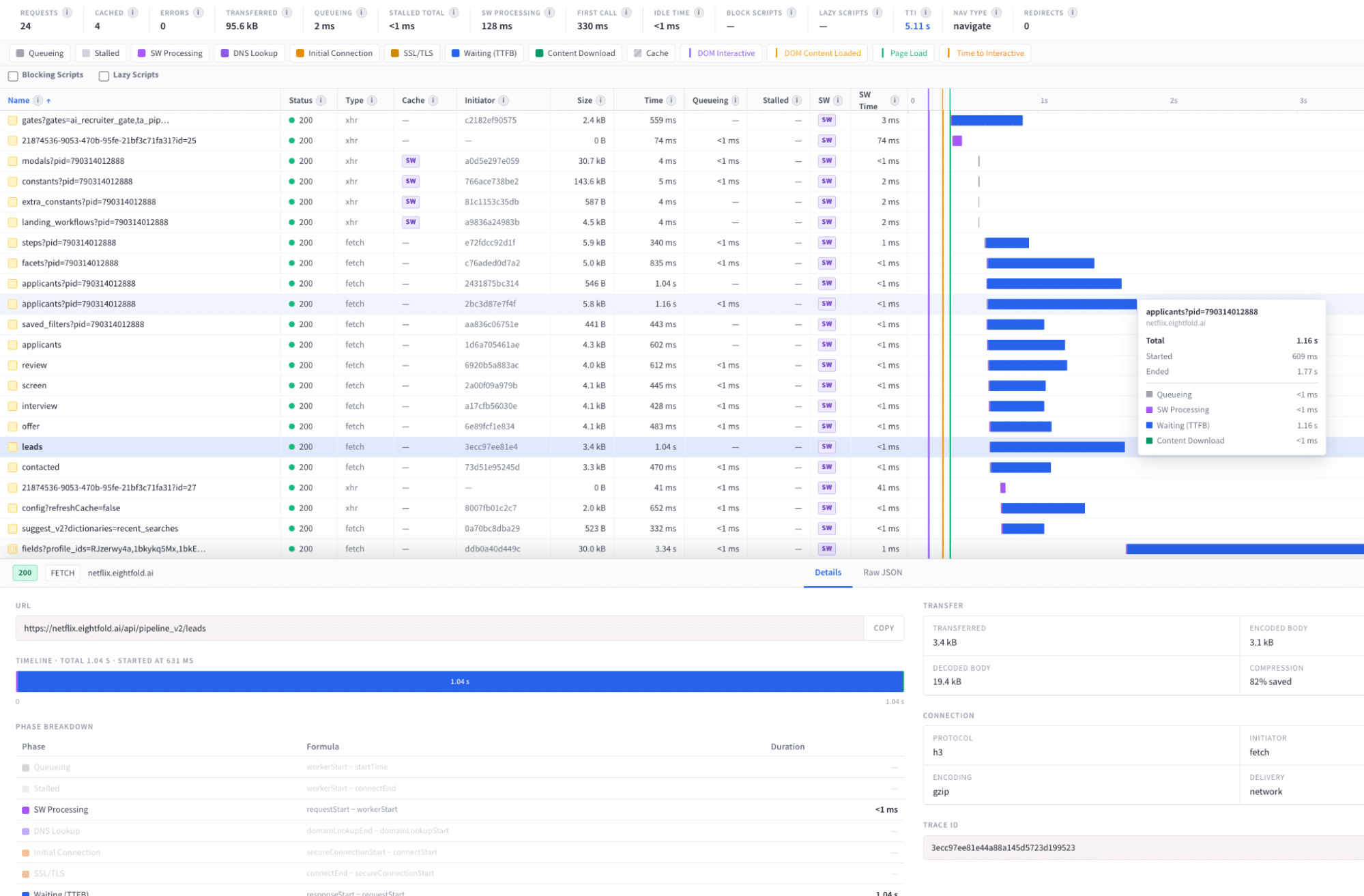
We are precise about what this covers. The stitching spans the API calls our client makes; scripts, stylesheets and fonts appear with their timings but carry no server trace. A trace ID arrives on a response, so browser queueing, DNS and TLS have none by construction, and we track those separately from the browser entry. Resource Timing also goes quiet across origins: without a Timing-Allow-Origin header, the connect, DNS and request phases return zero. That is why the edge is instrumented on our side rather than inferred from the browser.
Those gaps are also where we will still ask for a browser trace. A single component that is slow to become interactive on one user’s machine is usually doing client-side work that no server-side trace can see. The claim is not that we never need a HAR file. It is that it stops being the first thing we ask for, and it stops being something a customer has to produce before we can begin.
Performance Insights: what the customer sees
Most performance dashboards are internal. Ours is not.
The Eightfold admin console includes an Instance Health area with a Performance Insights tab: the same latency decomposition, for that customer’s own instance, read from the same metric store our engineers debug against. It is generally available to every customer today. It is live daily data, not a chart assembled before a quarterly review.
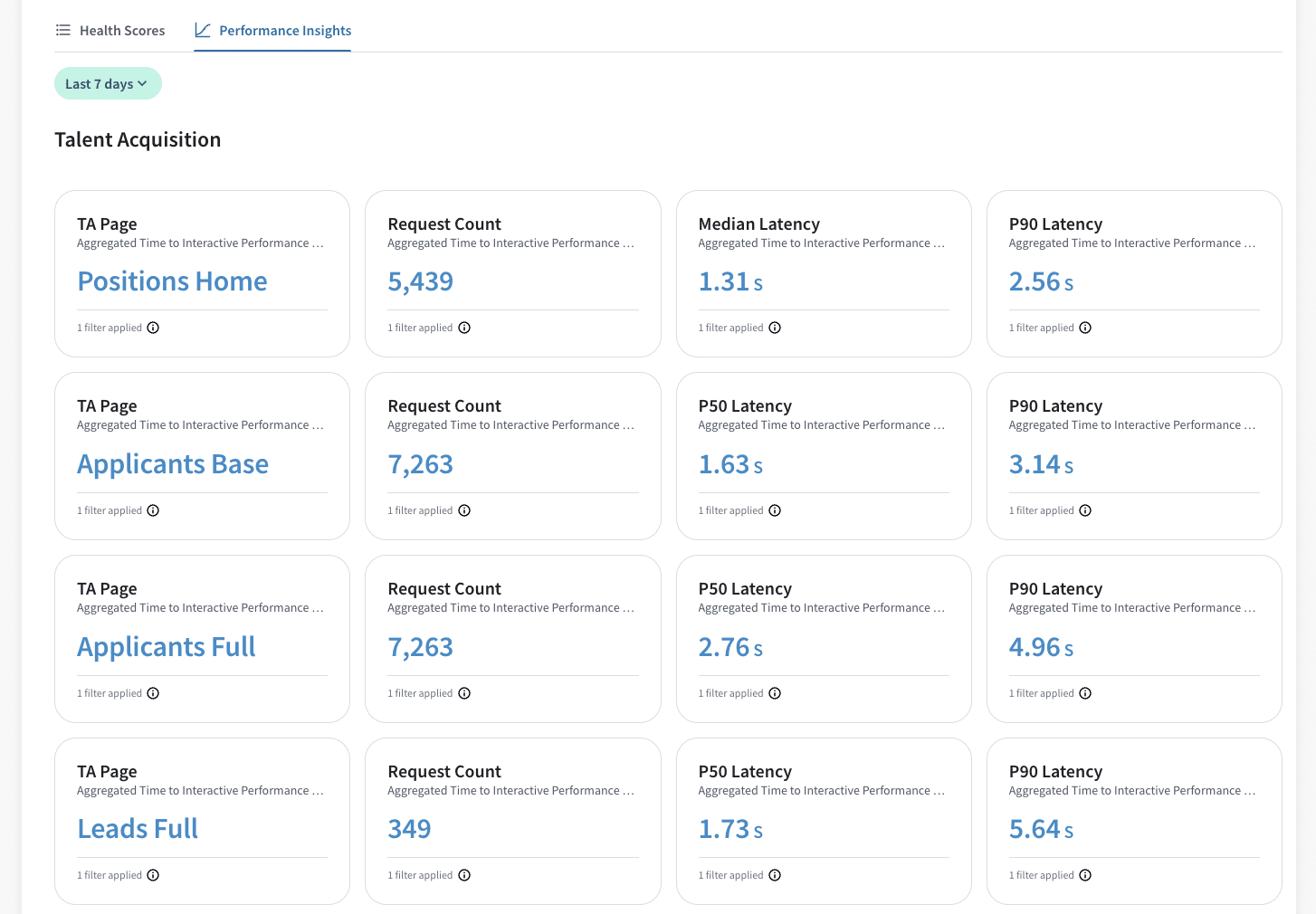
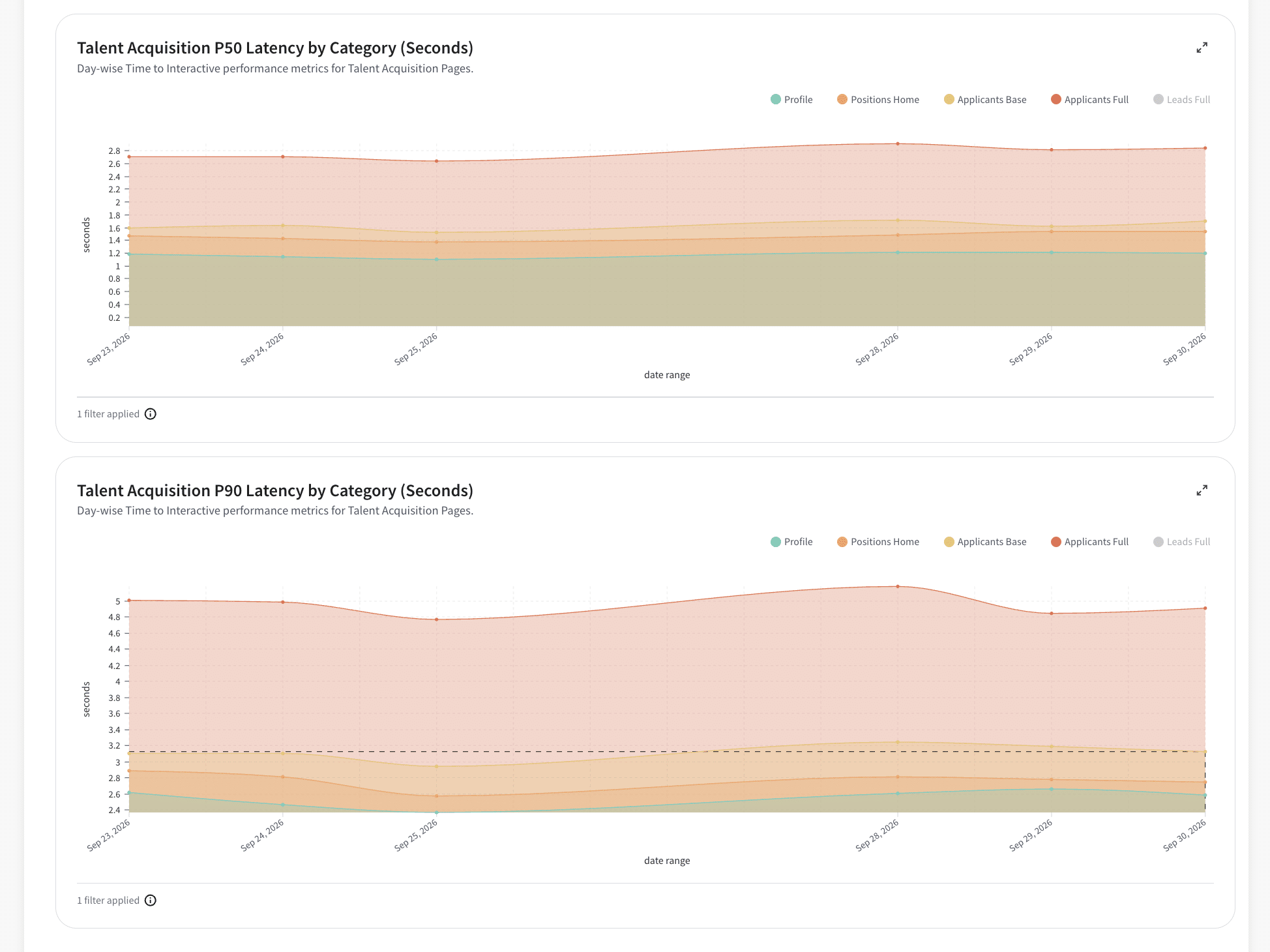
Status pages that publish uptime are common. Publishing the decomposition is not — not “the platform is healthy,” but this tenant’s own page-by-page, API-by-API latency, at daily granularity, from the engineering source of truth.
This changes the conversation. A regression cannot be described as expected variance when the customer can open their own trend line, and neither side spends time reconciling whose numbers are right. Support escalations, business reviews, and engineering triage all start from the same chart, which is why we put it there.
Catching regressions before merge, and after deploy
Instrumentation is inert until something reads it on a schedule.
- An automated performance review on every pull request, in normal CI. It flags likely regressions before merge instead of in production three weeks later — which matters most for exactly the drift described at the top, where every individual change looks harmless, and there is nothing for a human reviewer to object to.
- A daily latency report comparing each customer three ways: against yesterday, against the same weekday last week, and against the normal spread of that customer’s own series. The third comparison does the real work. A Tuesday that looks bad against Monday but sits within the usual variance isn’t an alert, and a system that pages on it gets ignored within a month.
- Automatic triage by an agent. When the report flags a customer, an investigation starts without waiting for a person. That agent is the next section.
The agent that runs the first investigation
A dashboard tells you that something is slow. Working out why depends on judgement that is usually undocumented and lives with whoever has done it most — which population to measure, which baseline is genuinely comparable, which of several moving numbers is the largest contributor rather than the loudest signal.
That judgment is method, and method can be written down. So we wrote it down, as a skill our LLM coding agent loads before it begins an investigation.
When the daily report flags a tenant, the agent picks it up and works the case before a human opens the ticket. It identifies the investigation type, checks whether the problem is specific to that customer, queries the metric store and request logs for evidence, and attaches what it finds to the alert. The engineer who eventually reads the ticket starts from a decomposition and a hypothesis rather than from a dashboard.
The skill it loads carries four things:
- A classification step. A regression since a date, a named endpoint for a named customer, one endpoint degrading across many tenants, and a slow page are four different investigations with four different procedures. The agent identifies which one it is looking at and runs the matching sequence.
- Metric definitions. What each number means, how it is computed, and which ones are not comparable with each other.
- A failure catalogue. The recurring shapes we have seen in production, so a known pattern is recognised rather than re-derived from first principles every time.
- Measurement rules. Including the one that costs the most time when it is missed: the noisiest error in a log is usually the one being caught and retried, so signal volume is a poor proxy for contribution.
Two design decisions carry the system:
- Blast radius is checked first. Before any per-customer investigation, one cheap query asks whether this is happening to everyone. If it is, the output is not a tenant analysis; it is “this is a platform incident,” reported immediately. The most expensive failure in performance work is spending an hour proving one customer is slow during an outage affecting all of them.
- Findings are written back, not re-derived. Every investigation reads prior findings and contributes what it learned. Findings carry a date, and anything older than a quarter is treated as a hypothesis rather than a fact.
The file is written for a person and is useful to an on-call engineer who has never opened an agent. That an agent can also execute it is what gets the first pass done at three in the morning.
Reconstructing any single page load
Aggregates tell you a page is slow. They do not tell you what happened to one user at 09:14 on Tuesday.
So we built a waterfall view reconstructed from our own web server logs. For any individual page load, we rebuild the server-side sequence – every API call, in order, with its duration – from page data we already retain. The browser and network halves come from the page’s own telemetry, and the trace IDs join the two.
This is distributed tracing assembled from logs rather than spans, and the reason is architectural. Our regional stacks are independent, and a customer’s logs already sit inside that customer’s region under their residency rules. Shipping per-request traces to a central backend is not available to us, so we reconstruct the sequence in region, from what we already hold.
When the daily report flags a customer, this is where the investigation lands: not an average, but one page load, with every call in the order it actually happened.
Common patterns, repeatable fixes
Performance work at this scale is not a hunt for exotic bugs. It is the same small set of patterns, appearing wherever a design that was correct for one tenant’s data volume meets another tenant’s. Each one below was a reasonable design when it was written, and each became the dominant cost on a page once a customer arrived with two orders of magnitude more data than the tenant it was designed against.
Each fix ships behind its own feature flag, so you can reverse any single change without a deploy.
Return the first useful result before the complete one. A single call that assembles everything a page needs returns nothing until its slowest part finishes. We split ours into a light call that returns twenty candidate identifiers and the heavier enrichment behind it. The moment the light call lands, the next request starts. Chaining a fast call into the next one is worth more than tuning inside the slow one, and it needs the most care, because two calls that used to be one can disagree with each other.
- Consume what an upstream system already computed. Counts that our search layer already returns alongside its results were being re-derived downstream against the database. This pattern hides well: both halves are individually correct, and the waste is only visible at the boundary between two systems built at different times.
- Collapse per-row work into one call. A lookup that runs once per row is invisible at development scale and dominant at enterprise scale, because the cost is a function of the customer’s list length rather than of the code. Batching those lookups is the most repeated fix in the whole effort, and the one the call-count metric exists to catch.
- Order the critical path for the worst connection, not the best one. Firing the primary data request first is worth milliseconds on a fast connection. On the connection-limited networks some enterprises still enforce, it removes seconds of browser queueing. Request order costs nothing to change and is easy to leave untouched for years.
- A disabled feature must cost nothing. A gated column continued running its supporting checks while the feature was switched off, because the gate sat around the visible behaviour rather than around the work feeding it. Gate placement is a performance decision, not only a product one.
- Empty, null and absent are three different things. An empty column list from the UI was read as the customer’s entire configured column set, pulling the most expensive columns into what should have been the fast path.
Beyond these, it is a long tail of the same discipline: scope queries to what is on screen, defer anything nobody is waiting on, and cache what does not change.
Why this compounds
Each piece makes the next one cheaper. Per-customer measurement makes the daily report meaningful. The daily report makes automatic triage worth running. The written method makes triage produce something an engineer can act on. And publishing to the customer console keeps all of it honest, because the number is no longer ours to interpret alone.
The configuration-driven design is what makes it durable. Instrumentation follows the page rather than being attached per project, and promoting a page into the published KPI set is a configuration entry rather than an engineering effort. That deliberate second step is a feature rather than friction: it keeps the customer-facing view to the journeys we are prepared to be measured on.
What we’re working on next
Detection runs daily today, comparing each customer against their own history. We are extending it to shorter windows, so the same comparison that works across weeks also works across hours.
The agent already establishes what is slow and who is affected. We are extending it to name the specific change responsible, so the engineer who opens the ticket starts from a commit rather than a chart.
Performance at scale is not a project with a completion date. It is an ongoing posture. The measure of success is a platform where “is this page fast for this customer?” has a verifiable answer, published where the customer can read it, and where that answer stays correct as the platform keeps growing.
Read more technical deep-dives on our Eightfold Engineering blog and explore open roles on our team.